
Your team practices with an AI teacher. You see who is ready.
Everyone gets a voice-based AI teacher that teaches with your company's material, runs real case practice, and grades performance. You get a dashboard showing who practiced and where they get stuck.
- Free demo
- No installation
- HR dashboard
- From 30 people
Not a video for everyone. Practice for each person.
Practice by speaking
Voice-based, 1-on-1 lessons. They explain in their own words, and the teacher asks follow-ups until it clicks.
With your company's real scenarios
The teacher uses your manuals, your products, and your real objections, not textbook examples.
Competency scorecard
Every training ends with a score and a concrete improvement for next time.
Role-based onboarding
New hires follow their step-by-step path without relying on anyone's schedule.
HR dashboard
Who practiced, how much, what topics they mastered, and who needs a check-in.
No installation required
Access right from the browser on desktop or mobile.
From your company's knowledge to tracking who actually learned.
 Done, I read your entire manual. Let's start with the discount policy—that's where margin is lost most.I'm a client: "It's more expensive than the competition, what can you do for me?" Answer me like you would in real life.
Next time: close with a date, not "let me know if anything comes up."
- 01Your material
Manuals, processes, onboarding, or catalog courses.
- 02Your own AI teacher
Teaches your content by voice, 1-on-1. Appears on video at the start and end of each module and key moments; the rest is voice and digital whiteboards.
- 03Practice
They do, not watch: scenarios with explicit criteria.
- 04Evaluation
Competency scorecard and a concrete point for improvement.
- 05HR dashboard
Minutes, topics completed, and last activity per person.
How it looks from both sides.
Real screenshots from the platform, using a sample company.
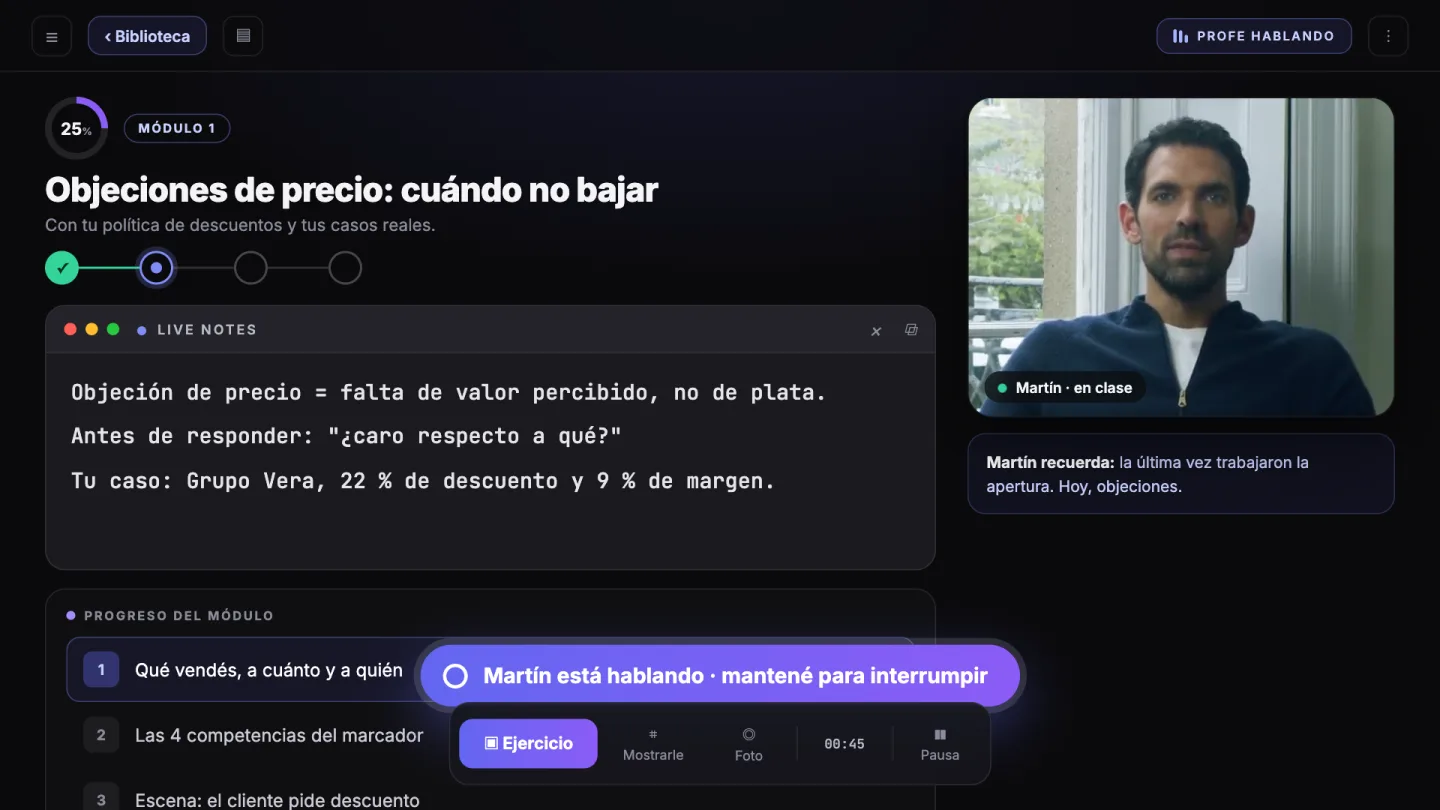
A lesson: the teacher speaks, the team practices.
The teacher explains by voice, writes on the whiteboard, and passes the floor back to the student.
- 1Live notes as he explains: key takeaways stay on screen.
- 2Video appears at key moments: at the start and end of each module. The rest is voice and whiteboard.
- 3Exercise at the end of each topic using a real company case.
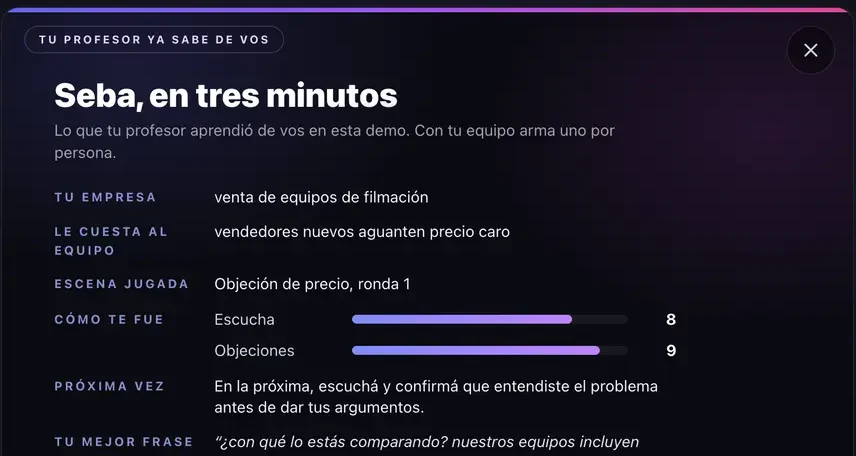
A training session: competency scorecard.
The teacher roleplays a tough client. Afterwards, each person sees how they performed on each competency and what to adjust.
- 1Listening, objections, closing: each with its own score.
- 2A concrete action item for next time, not just a "good job."
- 3Repeat until mastered: scores are logged on the dashboard.
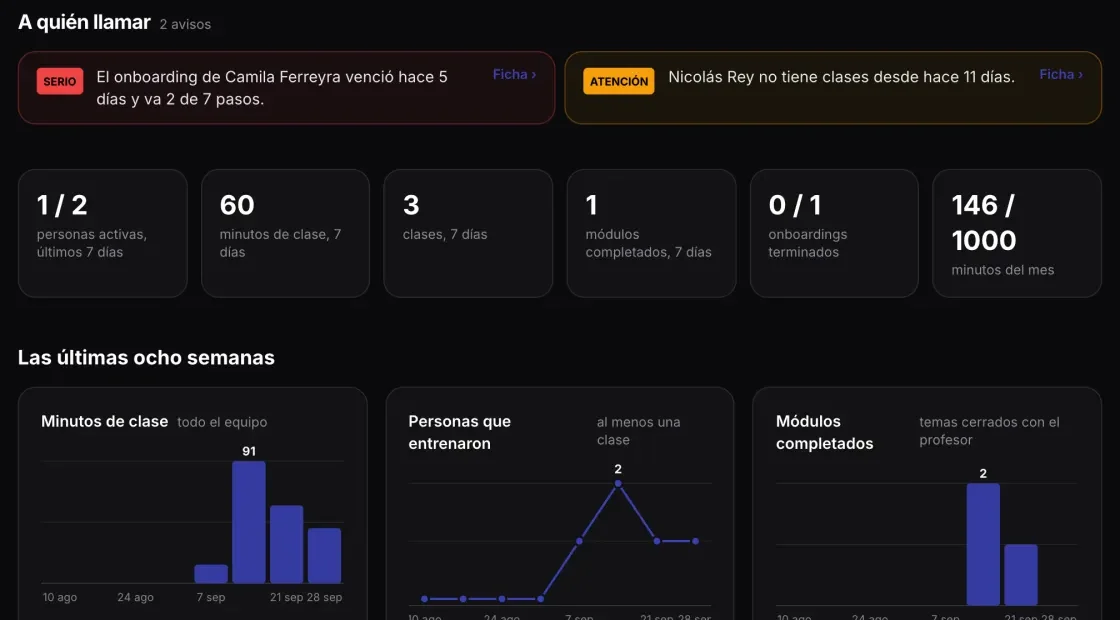
What managers see: who needs a check-in.
The dashboard flags who is behind on onboarding or dropped in score, and shows recent weeks' activity.
- 1Who to contact and why.
- 2Minutes, topics, and modules by person and by team.
- 3Exportable to spreadsheets.
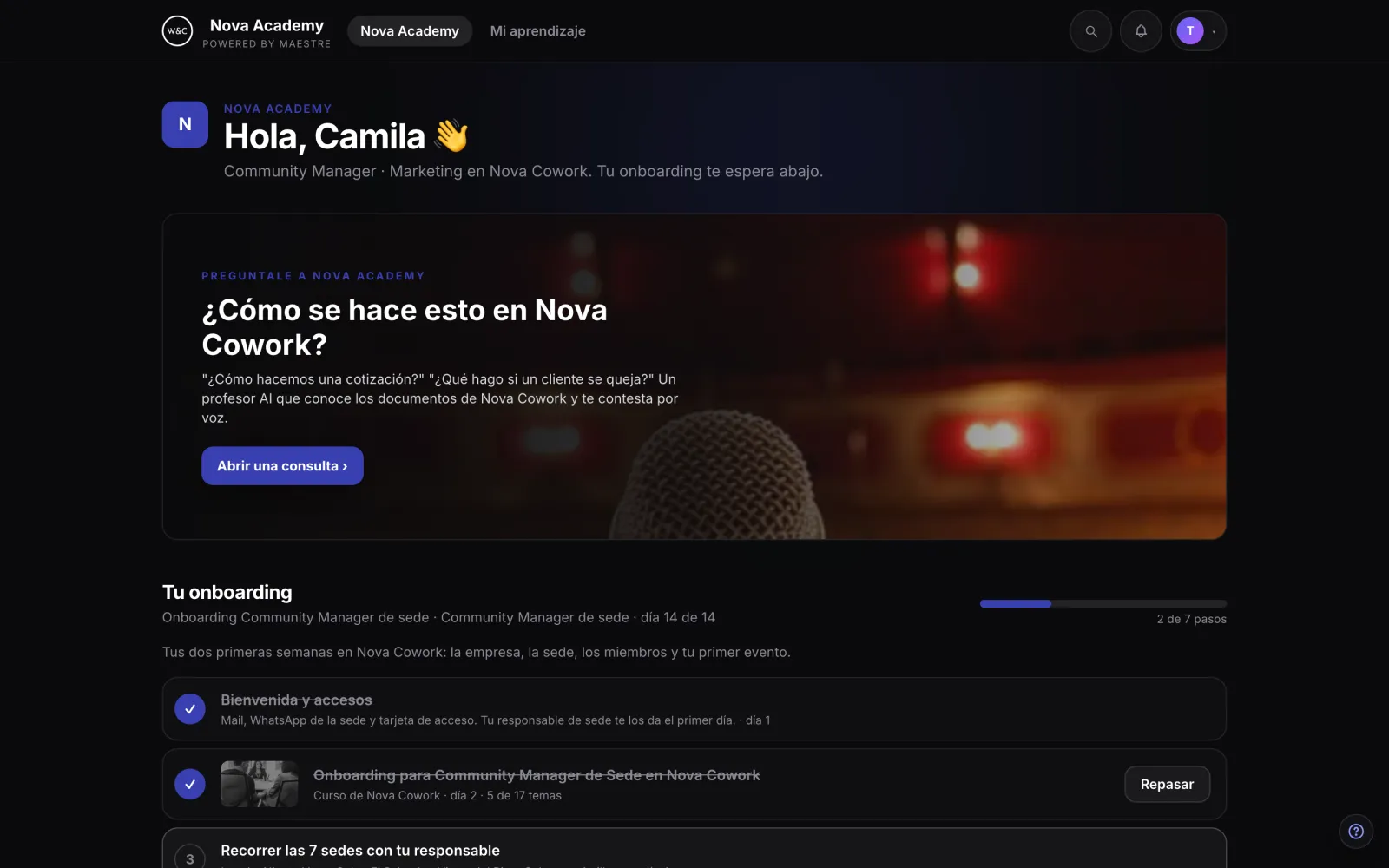
What each employee sees: their academy.
The academy carries your company's name. Everyone sees their onboarding and today's tasks.
- 1Ask the academy: answers directly from company documentation.
- 2Their onboarding with completed steps crossed off.
- 3From mobile or desktop.
Ready-to-use catalog and custom courses, all in one academy.
Ready-made courses & trainings
Every employee gets live class hours each month to explore the catalog at their own pace.
- AI, business, communication, productivity, and vibe coding
- Sales, public speaking, negotiation, and English trainings
- Dashboard tracking course completion, comprehension, and skill gaps
Your processes, turned into courses
Share your material (manuals, processes, recordings, current live onboarding) and we turn it into a course with a dedicated teacher, exercises, and assessments.
- Role-by-role onboarding
- Trainings built on your real use cases
- Stays in your academy: retake as often as needed
The courses and trainings they get access to.

Inteligencia Aumentada
Your personal AI workflow system, up and running.

AI para Negocios
with Martín · analytical and directStrategic analysis of YOUR business, built during the course.

Ventas
with Martín · analytical and directHandle price objections without dropping your price.

Comunicación Aumentada
 with Andrea · empathetic and demanding
Practice and refine your next real presentation.

Oratoria
with Andrea · empathetic and demandingHook your audience in the first 30 seconds of a presentation.

Trabajo y Productividad Aumentada
 with Laura · practical and organized
Your work system up and running by week two.

Vibe Coding & Automation
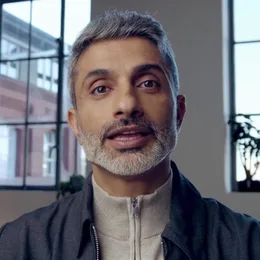 with Diego · technical and instructional
Your first published app plus a launch plan for your first users.

Entrevistas de Trabajo
with Laura · practical and organizedPitch your story with confidence in 90 seconds.

Inglés Conversacional
 with Emma · patient and conversational
Hold a fluent business conversation in English without getting stuck.
Where teams get started.
Price objections
Sales reps practice out loud with the teacher playing a tough client until responses come naturally before talking to real prospects.
Angry customers
Complaints, escalations, and retention practiced 1-on-1, with immediate feedback on phrasing and tone.
Difficult conversations
Performance feedback, constructive critiques, and clear boundaries—rehearsed before the real meeting.
Onboarding that sticks
Every new hire learns processes and culture with their AI teacher, while HR tracks who is truly ready.
Compliance beyond "I watched the video"
Every employee explains concepts in their own words, leaving a clear record of true comprehension.
Role-specific AI
Catalog AI courses tailored to your industry and tech stack.
Work on your actual cases.
Your team doesn't practice on canned examples: they show the teacher their real proposal, spreadsheet, or draft email.
Hold on at Grupo Vera: a 22% discount left your margin at 9%. What happened in that negotiation?
A proposal for your team, not a generic price list.
Pricing is per person, with live class hours pooled across your team. Book a free demo and we'll build a tailored proposal based on team size, required hours, and custom content needs.
Team size: starting at 30 seats, with volume discounts as your team grows.
Hours: each person gets monthly live hours; add extra credits for the team anytime with set caps or auto top-ups.
Content: full catalog included, plus onboardings and trainings built from your materials.
Minimum 6-month contract with monthly billing. No credit card required to start: we customize everything during the call.
From demo to active team practice in 6 to 8 weeks.
5-minute demo
The teacher demonstrates what Maestre can do for your business.
Tailored scenario call
A sample lesson built around a real topic from your team: a product, objection, or process.
10-minute trial
Up to 5 team members test it out on their own.
Proposal and agreement
Finalized based on team size and customized materials.
Rollout
6 to 8 weeks from signing: user onboarding, security setup, custom materials, and dashboard integration.
Your material is yours. And you know who accesses it.
What companies need to know before uploading company docs. No fluff: just straight facts.
Isolated company data
Data lives in row-level security storage: each user accesses only their data, each company only their team's. No external account can see your material or dashboard.
Your data does not train public models
Uploaded materials are used strictly for teaching your team. They are never used to train models or shared with third parties. Data is permanently deleted upon request if you leave.
Details on third-party data processors, seat management, and usage exports are outlined in our privacy policy.
Questions we get before the demo.
What happens to company data?
Each company only accesses its own data. Uploaded materials are used exclusively to train your team: they never train public models, are never shared, and are deleted upon request.
Is the AI teacher on video the entire lesson?
No. The teacher appears on video at the start and end of each module and key moments. The rest of the lesson is voice-guided with digital whiteboards and slides.
How long does onboarding take?
Between 6 and 8 weeks from signing: user accounts, permissions, security, custom content, and dashboard setup. Subsequent custom modules take less time.
How much does it cost?
Pricing depends on team size, required hours, and custom content scope. We build this during the demo call and send over a proposal. Plans start at 30 seats and a 6-month commitment.
Is any installation required?
No. Access it directly from your web browser on desktop or mobile devices.
people have already learned with us.
For thirteen years, we perfected online learning through Cineastas del Futuro and School of Creators. Now, we've turned that experience into a personal teacher for every student.
 Creators of
Cineastas del Futuro
 Seoul 2019
 Salzburg 2017
Show your team
how real practice feels.
A free demo: your use case, the live platform, and a proposal for your team.